| How to View and Print .PDF Documents |
You can view and print PDF (Portable Document Format) files using the free Adobe Reader, available from the Adobe web site. It's likely your computer already has the Reader installed, but if not click on the link below and follow the installation instrucitons:
Download the free Adobe Reader 
How to View PDF Files
Once the Adobe Reader software is properly installed, you just need to
click on a link to a .pdf file and it will be loaded for viewing on your
computer. (Note that the file is sent to your computer as a temporary file
that will be deleted when you exit your browser.)
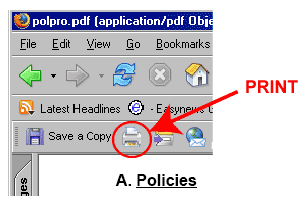
How to Print PDF Files
Do NOT
use the web browser print command. Instead, use the print button near the
left end of the Adobe tool bar, which appears immediately
above the document viewing window:
How to Save PDF Files
To save the file while you are viewing it, click the "Save a Copy" button (floppy disk image) at the left end of
the Adobe tool bar. To just save without viewing, in Windows place the cursor over the link
to the pdf file, right-click the mouse and select "Save Target As..." (or "Save Link As..." in Firefox). On a Mac, hold down the mouse button until the menu appears.